
How to Get the Most Accurate Digital Dental Evaluation
A few photos taken at home with your phone, a short questionnaire and, if you have them, your X-rays: that's all our team needs to study your case before you travel. Here is how to do it right, so your evaluation is as accurate as possible.
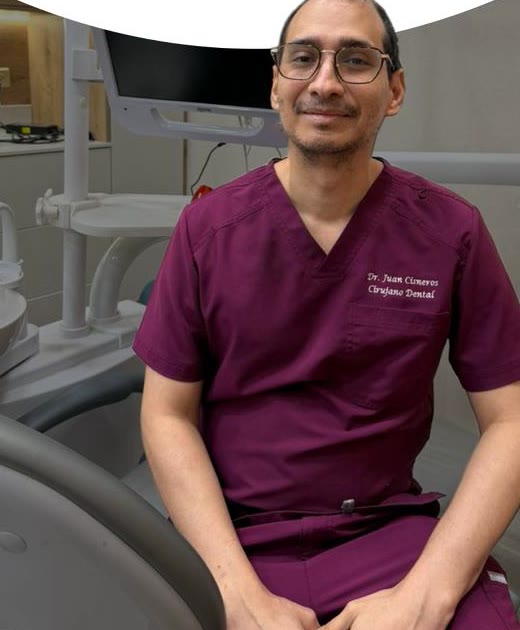
Take advantage of your evaluation with us. For now, for a limited time, it's free.
No obligation, and no need to fly to Panama to find out your options. Just three steps:
- Your photos, taken with your phone.
- A short questionnaire, mostly yes or no.
- Your X-rays, if you have them.
How would you like to reach us?
Choose whichever is easiest for you. All three reach our team.
Send us a short form with your emailLeave your name and email, and we'll write to you.
Privacy: we use your photos and health information only to evaluate your case, under Panama's Law 81 of 2019. By sending them, you give us your consent. Read the full text.
- For a limited time, the digital evaluation is free and with no obligation: you don't need to travel or pay anything to know your options.
- It takes three steps: 8 photos with your phone (about 5 minutes), a short yes/no questionnaire and, if you have them, your X-rays or CT scan.
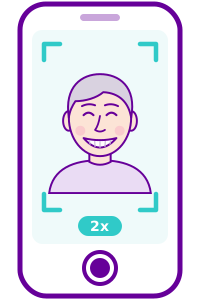
- For useful photos: daylight from the front, 1 meter (3 feet) away with 2x zoom, no filters and, ideally, a helper.
- It is reviewed by Dr. Juan Cisneros' team together with our own dental lab. You get a clear report with your options and next steps.
- It's honest: we recommend only what you truly need, and the final plan is confirmed at the clinic.
What the free digital evaluation is, and why it's honest
It's a remote study of your case. With your photos, your answers and your images, we look at your teeth, your gums and how you bite, then explain what we see and what your options are. For a limited time, it's free, with no obligation.
It's made for patients who live far from Panama City (in the US, Canada, the Caribbean or anywhere else) and want to know their options before booking a flight. It works for almost any treatment: ceramic veneers, a smile makeover, dental implants, All-on-4, or a second opinion on work done elsewhere.
Why it's detailed and honest
- A medical team reviews it. Dr. Juan Cisneros' team, led by our Medical Director, studies your case carefully.
- Together with our own dental lab. Our crowns, veneers and dentures are made in-house, and the lab reviews your case too: it knows what can be achieved and how.
- With photos that really work. When they are well taken, we can even use them in our smile design software to design your new smile digitally.
- Only what you need. We recommend only what you truly need. If your case needs less than you thought, we'll tell you.
Step 1: the photos (about 5 minutes)
We need 8 photos; the last one is a short, optional video. The photos let us see your teeth, your gums and how you bite. It's much easier if a family member or friend takes them.
Before you start: 8 tips
Turn off filters and beauty mode. And don't worry if a photo is not perfect: if we need another one, we will tell you.
The 8 photos, in order
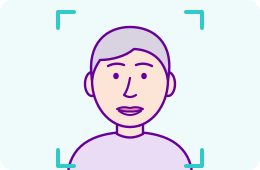
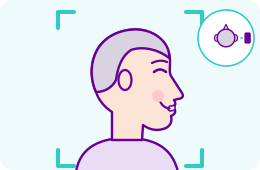
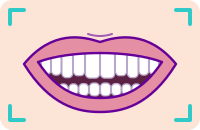
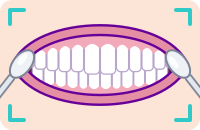
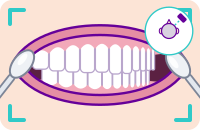
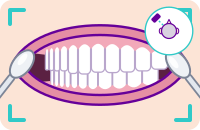
Photos 1 to 3 show your whole face; photos 4 to 7, only your mouth.

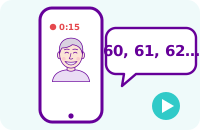 45
45Important: photos 4 and 5 go together
Same head position and the same bite in both. Only your lips change. Our smile design software lines up these two photos.
What exocad needs: the software we use to design your smile
To design your smile on the computer, exocad mainly needs two photos, taken with your head in the same position:
The most importantThe most importantTo get them right:
- Phone at the height of your eyes.
- Chin level, not raised.
- About 1 meter (3 feet) away, with 2x zoom: up close, the face gets distorted.
- Plain background and good light, without shadows.
- Glasses off.
Step 2: the questionnaire (about 3 minutes)
The questions are short and most are just yes or no. They tell us what you'd like to improve and whether anything about your health should be taken into account before we suggest a treatment, such as diabetes or certain medications.
Digital evaluation questionnaire
About you
Full name · Age · Country · Phone or WhatsApp · When could you travel? (month)
What would you like to improve? (check all that apply)
Missing teeth · Implants · Crowns · Smile design or veneers · Dentures · A check of work done elsewhere · Other
Your mouth (yes or no)
- Do you have pain in any tooth right now? Yes · No
- Do you have any loose teeth? Yes · No
- Have you been told you have gum disease (periodontitis)? Yes · No
- Do you already have implants, crowns or bridges? Yes · No
- Do you clench or grind your teeth (at night or during the day)? Yes · No
- Do you wear a removable denture? Yes · No
Your health (yes or no)
- Do you have diabetes? Yes · No
- Do you have any heart disease or a heart valve condition? Yes · No
- Do you take blood thinners (anticoagulants, daily aspirin)? Yes · No
- Do you take, or have you taken, bone medication (for osteoporosis)? Yes · No
- Do you smoke? Yes · No
- Are you allergic to any medication, anesthesia or latex? Yes · No
- Have you had radiation therapy to the head or neck? Yes · No
Images
Do you have recent X-rays or a CT scan? If so, send them to us (step 3).
Comments (optional)
Anything you'd like us to know.
Tap a button and the message opens with the questions ready: write your answer next to each one and send it. If you prefer, just reply to the email we sent you.
Privacy: we use your photos and health information only to evaluate your case, under Panama's Law 81 of 2019. By sending them, you give us your consent. Read the full text.
Step 3: your X-rays or CT scan (if you have them)
Photos show what can be seen; X-rays show what can't: the roots, the bone and what is under crowns or fillings. If you have recent ones, send them to us. These are useful:
- A panoramic X-ray (the one that shows your whole mouth in a single image): the file from your imaging center or a clear photo of it.
- A 3D CT scan (CBCT): we need the complete study in DICOM format, not just the PDF report or photos of a screen. Ask your imaging center for it that way.
How to share them
- Google Drive: upload the study folder, tap «Share», change access to «Anyone with the link» and copy the link. Send it to us on WhatsApp or by email.
- OneDrive: upload the folder, tap «Share», choose «Anyone with the link can view» and copy the link.
- Ask your imaging center: many can email the study or a download link (or share it through their patient portal). Ask them to send it to [email protected] with your full name.
- Small files (a panoramic X-ray as JPG or PDF): attach them to your email or send them on WhatsApp as a Document.
Privacy: we use your photos and health information only to evaluate your case, under Panama's Law 81 of 2019. By sending them, you give us your consent. Read the full text.
If you got the study on a CD or a USB drive, copy it to a computer first and upload the whole folder (zip it into a single file if you can).
No X-rays or CT scan? No problem. Start with the photos and the questionnaire, and write to us: we'll tell you which study to ask for, if one is needed.
What we need, depending on your case
Not every case needs the same things. See which group yours is in:
Simple cases
For example: Whitening, veneers, smile design or a few crowns.
What we need: The 8 photos and the short questionnaire.
Medium cases
For example: Bridges, missing teeth, or replacing old crowns or bridges.
What we need: All of the above, plus a recent panoramic X-ray.
Complex cases
For example: Implants, All-on-4 or a hybrid denture, or fixing work done elsewhere.
What we need: All of the above, plus a recent 3D CT scan (the DICOM files or a download link, and the radiology report if you have one). Also: the brand, model and size of your implants (a photo of the labels or the implant card your dentist gave you), the dates of previous surgeries, and an intraoral scan if you have one.
All of this is so we have the most complete information possible and can give you the best result: the more complete the information, the more exact your plan and your quote. If you don't have something, no problem: we'll tell you what to ask for.
How to send everything
To +507 6140-5700 (WhatsApp is free from any country). If you can, attach the photos as a Document (tap the paperclip, choose «Document» and select the photos) so they keep their quality.
Open WhatsAppTo [email protected], with the photos attached. Or simply reply to the email we sent you.
Write an emailAlways include your full name, so we can keep your photos, answers and images together in one file. We'll confirm they arrived and let you know if anything is missing.
Privacy: we use your photos and health information only to evaluate your case, under Panama's Law 81 of 2019. By sending them, you give us your consent. Read the full text.
How we design your digital smile
With your photos, our team and our lab design your new smile on the computer, step by step:
- You send us your photosThese are all the photos we need. The two marked ones are the ones exocad, the software we design your smile with, uses most.See how to take each photo, step by step ↑The most important
1. Big smile, from the front 2. Lips relaxed, from the front 3. Side profile, smiling 4. Your smile, close up The most important5. Lips apart, from the front 6. Lips apart, right side 7. Lips apart, left side 8. Optional: a short video 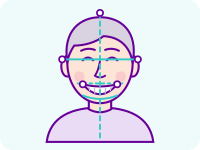 We mark your linesWe mark your facial lines, the midline and the proportions of your smile.
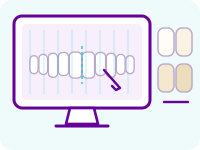 We design your teethOur lab designs your new teeth digitally, with a natural shape and shade.
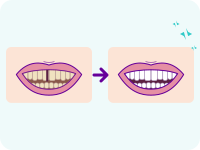 You see the before and afterYou see a simulation of how your smile could look, and we explain it calmly.
The simulation is a visual guide; the final result is confirmed at your in-person evaluation.
A real case: Antoine
Antoine works with us in our dental lab. We designed his smile with 8 lithium disilicate ceramic veneers. It was a case of medium-to-advanced complexity: he didn't want orthodontics.
More than 5 years later, his gums are healthy, the veneers are still very well sealed (we checked with X-rays at 5 years), his bite works well and the result looks natural.
We make up to 300 ceramic crowns and veneers a month, with extensive experience, and we limit the number of cases each month to guarantee quality.

Watch the video on YouTube · See his testimonial on Instagram
What you get
With all of that, our team prepares your evaluation and explains it to you clearly, in plain words:
- A clear report of what we see: your teeth, your gums and your bite.
- Your treatment options, explained one by one, and which one suits your case best.
- The next steps: what still needs to be confirmed (for example, a CT scan) and what your visit to Panama would look like.
Then, if you wish, we'll gladly schedule your appointment in Panama City; our flagship clinic on Vía Israel is 15 to 20 minutes from Tocumen International Airport (PTY). See your trip & stay. And if you decide not to go ahead, that's fine: the evaluation comes with no obligation.
This guide is general information. A digital evaluation guides you, but it does not replace an in-person exam: the diagnosis and the final plan are confirmed at your first appointment. Reviewed by Dr. Juan Cisneros, Medical Director, Panamá Sonríe.
Frequently asked questions
Is the digital evaluation really free?
Yes. For now, and for a limited time, the digital evaluation is free and comes with no obligation: you don't pay or book anything to get your report. If you then decide to have treatment with us, we plan it together.
How long does it take?
Taking the photos takes about 5 minutes and the questionnaire about 3. Once we have everything, we confirm the photos are usable (or tell you which one to retake) and send your report within a few business days. If your case needs an X-ray or CT scan you don't have, we'll tell you which one to ask for.
What happens to my photos and my information?
Privacy: by sending us your photos, X-rays or health information by WhatsApp, email or form, you give us your express consent to use them only to evaluate and plan your treatment, under Panama's personal data protection law (Law 81 of 2019). They are seen only by our clinical team, our laboratory and the digital design providers who work with us under confidentiality, including outside Panama. We never publish them or use them in advertising without your written permission, and you can ask us to delete them at any time. Full privacy policy: panamasonrie.com/en/privacy-policy
Do I need a CT scan?
Not to get started. With your photos and the questionnaire we can already give you a first evaluation; X-rays and a CT scan, if you have them, make it more accurate. For implants, the 3D CT scan (CBCT) is what shows how much bone there is, so an implant plan is always confirmed with one. If you don't have one, we'll tell you which one to ask for.
What if a photo doesn't come out well?
Don't worry. We check every photo when it arrives and, if we need one again, we'll tell you and explain what to change.
Shall we start with your photos?
Take advantage of your evaluation with us. For now, for a limited time, it's free.
Send us your photos and questionnaire whichever way is easiest for you, and our team takes it from there.
How would you like to reach us?
Choose whichever is easiest for you. All three reach our team.
Send us a short form with your emailLeave your name and email, and we'll write to you.
Privacy: we use your photos and health information only to evaluate your case, under Panama's Law 81 of 2019. By sending them, you give us your consent. Read the full text.